Showing posts with label Operating Systems. Show all posts

Friday, 28 September 2012

Sony is now rolling out Ice Cream Sandwich updates for the Xperia Go, U and Sola.

In terms of software updates, I think Sony is now the top Android manufacturer in this regard. Sony does not just take care of its top of the line phones, but even humble offerings like the Sony Live with Walkman got upgraded to Android 4.0 ("Ice Cream Sandwich").

Sony is now rolling out Ice Cream Sandwich updates for it mid-to-entry level range 2012 phones, the Xperia Go, U and Sola.


Hello everyone,
Today we’re starting our software rollout for Xperia go, Xperia U and Xperia sola including Ice Cream Sandwich Android 4.0 upgrade and new unique media applications. The rollout will continue over the next few weeks in markets globally.
Some of the cool features and functionality you can look forward to include:
  • New ways to experience your tunes, images, videos and films with Sony’s media applications – “WALKMAN”, “Album” and “Movies”
  • Extended standby mode, increasing standby time by up to four times (depending on user-profile and data consumption)
  • Lock screen with improved functionality
  • Resizable widgets for improved personalization
  • Improved control of your mobile data consumption
  • Recent Apps button for a clear overview of your applications
I’m also excited to tell you about “Glove Mode” – a sweet feature in the software upgrade for Xperia sola (known as Xperia sole in some markets). It’s an extension of our “floating touch” technology that makes it possible to use your Xperia sola in the cold whilst wearing gloves… just in time for the winter months. My colleagues at Developer World have taken a closer look – head on over to check it out!
We’re kicking-off the rollout today, and ramping it up over the weekend – from mid next week you’ll be able to see software kits as they’re released (customized specific to your operator and handset) on our support community. Please check-back then for the direct link and continue to do so, as the list will be updated when new kits become available.
It’s worth noting that in order to upgrade, you will need to connect to a PC or Mac – please visithttp://www.sonymobile.com/update and follow the instructions.
Thanks for all your questions so far and as always, feel free to drop a comment or question below.
Ant.
*The availability and scheduling of this software upgrade and specific models upgradeable to Android 4.0 will vary by market and carrier requirements

Source: Quote and Image from the Sony Xperia Product Blog


Tuesday, 25 September 2012

Samsung Galaxy S Advance and Galaxy Ace 2 to get Jelly Bean


Samsung has had two pieces of very interesting hardware I have been ignoring in my buyers guides, because they did not have commitments for Ice Cream Sandwich updates, the Samsung Galaxy S Advance and Galaxy Ace 2 to get Jelly Bean.

Well now they are lined up for a Jelly Bean update!  

The Galaxy S III, Galaxy S II, Galaxy Note, Galaxy Chat, Galaxy Beam, Galaxy Ace Plus, Galaxy Mini 2, and Galaxy S Duos and four tablets: the Galaxy Tab 2 7.0, Galaxy Tab 7.0 Plus, Galaxy Tab 2 10.1 and  Galaxy Note 10.1 are all also confirmed by Samsung for Jelly Bean updates.

Source: The Verge

Monday, 24 September 2012

Where in the World is Mary Grace? (Or, why Apple Maps makes the iPhone and iPad dumb devices in the Philippines)

Smartphones are wonderful, if sometimes creepy things. They are aware of where we are and that allows them to give us information relevant to us. The most useful of these features is maps and locations. Last Saturday night I tried to search for the nearest Mary Grace Cafe branch, and Apple Maps proved to be rather useless. 

This something that everyone else gets right. An Android phone using Google Maps has no problem finding every single branch for you. A simple "mary grace" search, gives you the cafe and other places similarly named, with the cafe, being the most prominent Mary Grace in the Philippines, being highlighted in the results. 


Clicking the results list allows you to scroll through all the hits.


Google Maps or Locations (whichever app you decide to use) will also give me directions.


Windows Phone

When Windows Phone joined the fray, it biggest disadvantage in the Philippines was Bing Maps. With Nokia Maps, a Windows Phone can not compete with Google Maps and Locations. Not always having a Windows Phone device to I asked @levine of TipidCP to help me out.


As you can see, Windows Phone 7.5 will find the closest relevant entry to you, show you other relevant hits and give you driving directions.


As you can see, the Nokia Maps and results are not as polished as Googles. On the other hand Nokia does give you offline voice guided turn by turn navigation. Google will not give you voice guidance and you cannot do it offline.

Apple iPhone and iPad

Before iOS 6, Apple iPhones and iPad used the same excellent Google Maps service. Since iOS 6, they  use Apple maps.

What does the iPhone do when I search for Mary Grace. It wants me to buy a ticket, fly to the United States and visit a Catholic Church there.

Over time Apple can populate the missing info. The problem is, before they do that they have to fix the maps they are using.

Compare Apple map info (left) to Google maps info (right).


Basically, Apple smart iPhone and iPads have are not so smart in the Philippines. How long before this is corrected? I do not know.

Siri was pretty useless in the Philippines in 2011 except in answering questions relating to information about other countries or general information. A year later it still is. But Siri was an optional feature easy to ignore. Maps and locations.... well lets put it this way, would buy a phone without GPS and where people cannot sent you the location of your appointments to your address book?

Until Google or Nokia release an iPhone app, buying a new iPhone means giving up smartphone core functionality in the Philippines. If you already own one, do yourself a favor and stick with iOS 5.1.1. Or you could buy third party navigation software from the iOS store. This won't correct all the issues, but it is better than nothing.


Saturday, 22 September 2012

The worst thing about the Apple iPhone 5 is that it comes with iOS6

Trying to search for the nearest branch of a cafe last night on a Apple iPhone 4, updated to iOS 6 is that the Maps application is virtually useless in the Philippines. I have read complaints from users abroad saying that it takes them to the wrong place. No similar problems in the Philippines. It won't know the place exists in the first place. 

Google Maps finds every branch in the country, and even some obscure places with the same name I did not know existed.


The problem would be a poor database. For places in the database, trial and error will be needed to find out if they are in the correct place.  Another issue, could be typographical errors so the Map will not identify the place you are looking for. A friend of mine on her iPad 3 tweeted "check out UPD map. Kalayaan residence hall typed as 'Kalayaan Schoolicidence' haha!." A simple spell check should have detected that. 

Over time that will probably be corrected. But this habit of Apple launching beta software is getting tiring. Last year, it launched Siri, as a beta, but from Apple advertisements you would not think it was beta software. But, it was not a big deal. It was an additional feature which you could simply ignore.

Mapping and locations software is one of the key features what makes a smartphone a smartphone. Apple's iOS5 had a very good map and locations software, in Google Maps and Places. iOS6, well it uses Apple Maps, which should not even be called Apple Maps Beta. It should be considered an Alpha release. 

So while Apple wows us with supposedly better 3D views and features, basically, iOS6 throws all the nice hardware in the iPhone 5 back to the stone age.

Apple, please fix Maps. In the meantime, give users back Google Maps.

Monday, 10 September 2012

Android 4.1.1, Jelly Bean Update Now Out Smart Communications Issued Samsung Galaxy Nexus Phones


The Android 4.1.1, Jelly Bean update is now rolling out over for Smart Communications issued Samsung Galaxy Nexus phones. The 160 MB update quietly came in over-the-air over the phones 3G connection.


What's new in Jelly Bean (Scource: Android.com)

Android Beam


  • With Android Beam, you can now easily share your photos and videos.
  • Instantly pair your phone or tablet to Bluetooth® devices like headsets or speakers that support the Simple Secure Pairing standard by just tapping them together.

Audio Accessories

  • Support for USB audio docks, shipping later this year.

Browser Browser and WebView

  • Browser has improved performance, CPU and memory efficiency. With better performance for animations and HTML5 canvases and an updated JavaScript Engine (V8), pages load faster and feel smoother.
  • Browser now has better HTML5 video support, and has a new user experience. Just touch the video to play and pause, and smoothly transition into and out of fullscreen mode.
  • Browser now supports the updated HTML5 Media Capture specification on input elements.
  • WebView now supports vertical text, including Ruby Text and other vertical text glyphs.

Calendar Calendar

  • Calendar is more buttery. Content fades in, animations are sprinkled throughout, and swiping/paging between days is smoother.
  • Calendar will now display event colors if you've given your event a color on your PC.
  • The 'Today' button on the action bar now shows the current day. When viewing an event's details, you can now email all the guests with a single tap.
  • Notifications for upcoming events now display more of the event description to let you quickly see relevant details without having to open the app.
  • Notifications for upcoming events now let you email all the guests without opening the app, and you can choose a quick response such as "Be there in 10 minutes" or type your own.
  • A new option in Calendar settings lets you create your own default quick responses for emailing guests.
  • You can now snooze an upcoming event reminder right from the notification.
  • Calendar has a new 7" tablet layout that is optimized for the form factor.
  • When viewing Calendar in portrait orientation on tablets, you can hide or expand controls to give you complete control over how you view your Calendar space.
  • Calendar will now remember whether you've chosen to hide or expand controls so you have a consistent experience viewing Calendar whenever you open it.

Camera and Gallery Camera and Gallery

  • You can now swipe from the camera viewfinder to quickly review photos you've taken without having to leave the camera app. You can swipe back to the camera viewfinder to start snapping photos again.
  • When viewing photos in Gallery, you can pinch to zoom out to enter "filmstrip mode" and rapidly review photos. When viewing photos in filmstrip mode, you can swipe up or down to delete an individual photo. You can also undo the delete with a single tap.
  • When taking a photo, a new animation sweeps your photo off the screen. There is now a new paging animation when swiping between photos.
  • Camera features a new animation for switching between the front-facing and back cameras.
  • When focusing on an object in Camera, a new animation gives you visual feedback on your focus state.
  • Gallery features a new animation when selecting a photo from within the album view and back.

Data Usage

  • You can now dismiss a data usage warning without changing the data threshold set for warning notifications.
  • Disable background data usage on certain Wi-Fi SSIDs by designating them as mobile hotspots.
  • Android now automatically detects when one Jelly Bean device is tethered to another's Wi-Fi hotspot, and intelligently enables or disables background data usage on the SSID.

Face Unlock

  • Face Unlock is now faster and more accurate, and startup is smoother with a new animation.
  • You can improve face matching accuracy by calibrating your face in different conditions and with different accessories (e.g. hat, glasses).
  • Face Unlock can now optionally require a 'blink' to verify that a live person is unlocking the device rather than a photo.

Internationalization

  • Jelly Bean adds support for bidirectional text and more input languages to make the platform accessible to more people around the world.
  • There is improved support for Arabic and Hebrew, including a new Arabic font, in the platform.
  • You can now enter text in one of 18 new input languages, including Persian, Hindi and Thai. Additional Indic languages Kannada, Telugu, and Malayalam are now supported by the platform.
  • Emoji from Unicode 6.0 will now render when received or viewed.
  • If the system language is set to Japanese, Japanese specific versions of glyphs will now be properly rendered.

Keyboard

  • The platform's dictionaries are now more accurate and more relevant.
  • The language model in Jelly Bean adapts over time, and the keyboard features bigram prediction and correction.
  • You can now switch languages quickly with the dedicated language selector key on keyboard.
  • You can use custom keyboard input styles for more than 20 languages, with keymaps for QWERTY, QWERTZ, AZERTY, Dvorak, Colemak, and PC styles.
  • You can choose the input styles that you want to use for each keyboard, and use a hotkey to switch between them while typing.

Messaging and Talk Messaging and Talk

  • New notifications display the full text of incoming SMS messages. When receiving an MMS, you can view the full photo in a notification.
  • When entering recipients for an SMS or MMS, a new UI collects recipients as chips, making it easier to compose messages.
  • Talk features a new notification style.

Notifications

  • You can now take action on notifications directly from the redesigned notifications shade.
  • Notifications from the same application are grouped together, and the first item is automatically expanded. You can also pinch notifications to expand or collapse them.
  • You now get an image preview in notifications after taking a screenshot. You can quickly share the screenshot directly from the notification.
  • You can lock automatic display rotation from the notifications shade on 7" tablets.
  • For Wi-Fi only devices, quickly see the SSID of the access point you're connected to from the notifications shade.
  • You can now touch-hold a notification to identify the application that created it and turn off notifications from that application if needed, as well as uninstall the application.

Networking

  • Wi-Fi protected setup is now supported with WPS push button and PIN support.
  • A new setting lets you stay on mobile data and avoid nearby Wi-Fi networks with poor connections.

News News and Weather

  • News and Weather is updated to improve freshness and power consumption.

People People

  • The People app is more buttery with smoother animations and improved search performance.
  • The People app now retrieves high res photos automatically for Google contacts with public Google+ profiles and displays higher res photos (720x720) on certain devices.
  • High res photos set on Google accounts will be backed up and synced across devices.
  • The People app has a new 7" tablet layout that is optimized for the form factor.
  • You can now quickly add your favorite contacts to a home screen, directly from the contact's details page.
  • The People app helps you organize your contacts and reduces duplicates with an Improved auto-joining algorithm.
  • You can now clear the frequently contacted list from the favorites tab in the People app.

Phone Phone

  • When you miss a call, a new notification lets you return the call or reply by SMS with a single touch.
  • Incoming visual voicemails are displayed in a new notification that lets you play the message with a single touch.
  • When a call is ongoing, a new notification lets you hang up the call with one touch.
  • As part of Project Butter, the dial pad is more responsive. Call log scrolling is buttery smooth, and swiping between tabs in Phone is quick and fluid.
  • You can now clear your frequently contacted list in the favorite tab of Phone.
  • You can now add phone numbers from the call log to existing, read-only contacts.

Settings Settings

  • Accounts are now displayed in the primary Settings view so you can easily see all the accounts you're signed into on your device.
  • You can now easily access all Google Privacy Settings in one place by selecting your Google account from Settings.

System System

  • Device encryption is now more reliable, and periodically reminds you to decrypt your device. Now, SMS messages and calls are declined when waiting for decryption.
  • You can long press the 'Power Off' option in the power menu to boot your device to safe mode.
  • A new 'Reset app preferences' button lets you quickly reset default applications for specific activities, background data restrictions, notifications suppressions, and more.
  • A redesigned dialog with larger icons lets you intuitively choose your preferred application for specific activities.
  • Google Apps Device Policy on your device may now override the 'keep screen awake' option from developer settings.

Text-to-speech

  • Jelly Bean introduces a new conversational text-to-speech voice in US English, available as both a network engine and an embedded engine via the TTS API.

Voice Typing

  • A new embedded speech recognizer lets you use Voice Typing even when you don't have an Internet connection.

Widgets Widgets

  • Jelly Bean makes it easier to personalize your home screen. As you place widgets on the screen, everything else automatically moves to make room.
  • When they're too big, widgets resize on their own. If you choose to resize a widget, apps and widgets will now also move out of the way.
  • You can now quickly remove apps or widgets from any home screen by picking them up and flinging them to the edge of the screen.
  • Launching apps and returning back home are now faster and smoother.

Accessibility Accessibility

  • With Jelly Bean, blind users can use 'Gesture Mode' to reliably navigate the UI using touch and swipe gestures in combination with speech output.
  • With the new accessibility focus feature, you can move a cursor between controls to maintain a target for the next action or a source for the next navigation event. You can double tap anywhere to launch the current item with accessibility focus.
  • Text traversal in accessibility now gives you more control – choose to move between pages, paragraphs, lines, words or characters.
  • TalkBack, a screenreader for Android, now supports gestures to trigger actions, to navigate applications, and traverse text.
  • Get full support for braille accessibility services (download BrailleBack on Google Play).

Saturday, 8 September 2012

Android Displays the Power of Open Source

I have five Android devices used by different members of the family.


  • HTC Desire HD (Released Q4 2010)
  • Samsung Galaxy Tab P1000 (Released Q4 2010)
  • HTC Sensation XE (Released Q4 2011)
  • Google Galaxy Nexus (Released Q4 2011)
  • Samsung Galaxy S III (Released Q2 2012)


All these are, or were, top of the line handsets at the time of their release. However, software support has been so so.

  1. The HTC Desire HD and Samsung Galaxy Tab are officially stuck at Gingerbread (Android 2.3.x) due to alleged "performance issues" or other issues. 
  2. The HTC Sensation is on Ice Cream Sandwich (Android 4.0.3), and while HTC may update this phone to Android 4.1, my view in HTC's support for softwares updates these days is dimm, so I think this phone will get stuck here.
  3. The Google Galaxy Nexus and Samsung Galaxy S III are on Ice Cream Sandwich with Jelly Bean on the way.
So, if we were to look at just Ice Cream Sandwich upgrades, with five top end Android devices, we would have 40% fragmentation. 

But Android is open source. It means kind hearted third parties can mess around with it and give, us what the manufacturers don't want too.

The Samsung Galaxy Tab P1000 is now on Ice Cream Sandwich (Android 4.04) courtesy of CyanogenMod.  Work is already being done on a Jelly Bean ROM (Android 4.1), with a very functional experimental version on its third release, expect a stable version of this ROM out within the month, or next.

The HTC Desire HD is now also on Android Ice Cream Sandwich (Android 4.04) courtesy of Team Blackouts ICS Incredible. Actually, it is hard to pick a good Ice Cream Sandwich ROM for the HTC Desire HD. You have too many choices. You have a nice stable full Sense 4 ROM from the Virtuous Team, a nice AOKP (Nexus like) ROM from LorD CloakaN, and literally another dozen other versions. There are already several mature Jelly Bean options too, and if that suits you randomblame's Jelly Time is a good bet.

Of course, you will need to root your phone, and many fora are not too newbie friendly. Don't go it on your own. The nice people at the Phandroid Android Forums are very happy to help first time rooters.

So, what is the bottom line? 

Manufacturers Ice Cream Sandwich compliance for < 2 year old devices = 60%.
Manufacturers + Community Ice Cream Sandwich compliance for < 2 year old devices = 100%.

Will report on the Jelly Bean score card in a few months.

In the end, two obsolete devices, the HTC Desire HD and the Samsung Galaxy Tab have gotten updated that make them viable for a another year or so of use.

Look at this in contrast to a closed environment. The original Apple iPad has good hardware, better than the Apple iPhone 3GS. But the 3GS get one more update to let it live on till 2013. In a few days or weeks, the Apple iPad will be offically obsolete.

Wednesday, 29 August 2012

Samsung ATIV S - The New Face of Windows Phone


Samsung has officially announced the first Windows 8 Phone ATIV S. It is essentially a Windows Phone 8 version of Samsung's Android powered Galaxy S III. The ATIV S packs a 4.8-inch Super AMOLED display with a 720 x 1280 HD resolution and has Gorilla Glass 2 for protection. Inside is a 1.5GHz dual-core processor and 1GB of RAM. While not a quad-core, this dual core chipset packs the advance Qualcomm Krait processor which allows it to match and even outrun its quad-core competitors.  This is backed up by 1 GB of RAM. At the back, there’s an 8MP primary camera with 1.9MP secondary camera at the front. This a a big phone at 137.2 mm x 70.5 mm x 8.7 mm but it weighs in at just 135 grams. 

Now this is not just a re-skinned Galaxy S III. Samsung has improved its design and allows for a massive 2,300mAh battery to fit in that slim 8.7 mm frame. Connectivity options include HSDPA, Wi-Fi, Bluetooth 3 and NFC. I expect an LTE version will also be released.


Internal storage is either 16 GB or 32 GB, but Windows Phone 8 now supports memory expansion slots and the Samsung ATIV S has a microSD card slot to allow expansion of its 16GB or 32GB built-in storage.

Pricing and availability is yet to be confirmed, but I am pretty sure this smartphone will hit the shelves immediately after Microsoft officially releases the Windows Phone 8 in October this year. Expect a price similar to the Galaxy S III.

When the first Windows Phone 7 device launched, they were competitive in terms of hardware, but the software was a bit behind the curve. By the time Windows Phone 7.5 was out, the supported hardware was outdated due to lack of multi-core processor support. With Windows Phone 8 and phones like the ATIV S, the Windows Phone platform fight Apple and the Android world on equal footing.

Sunday, 26 August 2012

SMS Security Flaw Affects only Apple's iPhone and iOS Devices

A week ago,  I wrote about the SMS security flaw discovered on Apple's iPhone which could be used be used to make it appear that the SMS one sender, and when you reply send the SMS to a mobile number different from the one that is displayed on phones screen. 

Apple responded by suggesting the SMS is not a secure form or communication and the flaw was with SMS itself, and suggested using iMessage instead. iMessage is basically an instant messaging application which can be used to communicate with other Apple devices.


"Apple takes security very seriously. When using iMessage instead of SMS, addresses are verified which protects against these kinds of spoofing attacks. One of the limitations of SMS is that it allows messages to be sent with spoofed addresses to any phone, so we urge customers to be extremely careful if they're directed to an unknown website or address over SMS." (Source: Engadget).

Tech Radar, citing a study conducted by security firm AdaptiveMobile found that the flaw is not with SMS in general but limited only to iOS devices. 

"We have tested this issue on Android, Windows Mobile, BlackBerry, and Symbian phones," said Cathal McDaid, security consultant at AdaptiveMobile, in a statement to CNET, "and most of them simply ignore the 'reply address' field or display both the 'real' originating address and the reply address as per the specification recommendations. 
"The iPhone, so far," he continued, "is the only device which does not comply with these security recommendations."

Instead of suggesting users use iMessage, Apple should simple fix this flaw. Apparently, everyone else has.

Wednesday, 22 August 2012

Jelly Bean will be coming to the international version of the Samsung Galaxy S III next week


Phone Arena reports that Android 4.1, a.k.a. Jelly Bean, will be coming to the international version of the Samsung Galaxy S III next week.

Android 4.1 makes a lot of substantial updates to Android 4.0.4. 

Here are some of the key changes from the changelog:


  • Blind users can use 'Gesture Mode' to reliably navigate the UI using touch and swipe gestures in combination with speech output.
  • TalkBack, a screenreader for Android, now supports gestures to trigger actions, navigate applications, and traverse text.
  • Browser has improved performance, CPU and memory efficiency. With better performance for animations and HTML5 canvases and an updated JavaScript Engine (V8), pages load faster and feel smoother.
  • Browser now has better HTML5 video support, and has a new user experience. Just touch the video to play and pause, and smoothly transition into and out of fullscreen mode.
  • Calendar is now smoother. Content fades in, animations are sprinkled throughout, and swiping between days is smoother.
  • You can now swipe from the camera viewfinder to quickly review photos you've taken without having to leave the camera app. You can swipe back to the camera viewfinder to start snapping photos again.
  • When taking a photo, a new animation sweeps your photo off the screen. There is now a new paging animation when swiping between photos.
  • You can now enter text in one of 18 new input languages, including Persian, Hindi and Thai. Additional Indic languages Kannada, Telugu, and Malayalam are now supported by the platform.
  • You can use custom keyboard input styles for more than 20 languages, with keymaps for QWERTY, QWERTZ, AZERTY, Dvorak, Colemak, and PC styles.
  • Notifications from the same application are grouped together, and the first item is automatically expanded. You can also pinch notifications to expand or collapse them.


Monday, 20 August 2012

Sony Xperia S to get De Facto Nexus Status

Jean-Baptiste Queru, Google's top Android Open-Source Tech Dude (well, actually Technical Lead of Google's Android Open Source Project) announced on Google Groups that the Sony Xperia S will be getting updates directly from Google.


Quere said "For a new challenge, I'd like to try to go one step further, and to target some hardware beyond the usual categories. I've added a git project for the Sony LT26, i.e. Xperia S. This seems like a good target: it's a powerful current GSM device, with an unlockable bootloader, from a manufacturer that has always been very friendly to AOSP."

The Sony Xperia S was an interesting device. It had a 4.3-inch 720p display in a market of Android flagship phones with larger 4.7 to 4.8-inch 720p displays. The only spoiler in the package, is that while its competitors came with new for 2012 chipsets, the Nvidia Tegra 3, Qualcomm S4 and Samsung Exynos Quad, the Xperia S came with a dual core Qualcomm S3 which we first saw in the HTC Sensation back in the first half of 2011. All-in-all, the Xperia S is like a sleek car with a mediocre engine under the hood. Still, Sony did a good job with the Qualcomm S3, squeezing out more performance from the chipset than any other OEM ever did. 

All of a sudden, the Sony Xperia S looks a lot more interesting. Priced substantially lower than its competitors, being a "mid-sized" offering and now with updates direct from Google's AOSP team. Even more interesting, it looks like the Xperia S will become the platform for a Google Skunkworks project for the creation of the next iteration of Android.

"Contributions are strongly encouraged, and there should be more freedom than usual to submit experimental changes since that won't impact the devices that Google is most directly involved in," Quere said.  

So, the somewhat boring Sony Xperia S, might now become transformed as the home of the latest cutting edge Android code.

Sunday, 19 August 2012

The Power of Open Source

Love or hate Windows, one really good thing about Microsoft is that they support a Windows version forever. Well, not literally forever,  but longer than the computer you bought it with is likely to last. Todays new generation computers, made up of smartphones and tablets, are not as lucky. One to two years is what you are likely to get. 

Apple's original iPad, released in March 2010, came with  iOS 4, was upgraded to for two years all the way to iOS 5.1. It wont be getting iOS 6 which will be rolling out to other iOS devices this September.  The Google Nexus One launched in January 2010, started life with Eclair (Android 2.1) and moved on to Gingerbread (Android 2.3). It did not officially get Ice Cream Sandwich, released on October 2011. Basically, you can expect high end devices to get the latest OS for 18-months to 2-years. That does not sound all the impressive.

Many devices are less fortunate. The Samsung Galaxy Tab and HTC Desire HD, both released on October 2010, did not get official an official Ice Cream Sandwich (Android 4.0) updates from Samsung and HTC. Pretty much it got OS updates for just 12-months. Notably, these two devices are more powerful than several new Android phones and tablets which today come with Ice Cream Sandwich out of the box.

But Android is open source. This means, that someone else can legally build what the the Original Equipment Manufacturer does not. This month I upgraded a HTC Desire HD to Android 4.0.4 courtesy of the Blackout ICS Incredible ROM Blackout Team. The Samsung Galaxy Tab got Ice Cream Sandwich via CM9 form the CyanogenMod Team. These are stable ROM's which I now use as my daily drivers and based on months of test versions being released. This illustrates the power of open source. Two obsolete devices are now good for use for another year. And it does not end there. Jelly Bean (Android 4.1) ROM's for both devices have been on beta tests for over a month now. 


Saturday, 18 August 2012

Apple iPhone SMS flaw discovered. Apple's solution, use iMessage instead.

Last Friday, pod2g's discovered a flaw in the SMS application used in the Apple iPhone. The flaw allows a sender of a malicious address to make it appear that the message comes from a trusted source. This could allow "pirates could send a message that seems to come from the bank of the receiver asking for some private information, or inviting them to go to a dedicated website." This flaw is still present in the latest beta of the next version of iOS6 which will be released together with the next iPhone. 

Apple's response to the matter has been to effectively say use iMessage instead:

"Apple takes security very seriously. When using iMessage instead of SMS, addresses are verified which protects against these kinds of spoofing attacks. One of the limitations of SMS is that it allows messages to be sent with spoofed addresses to any phone, so we urge customers to be extremely careful if they're directed to an unknown website or address over SMS." (Source: Engadget).

The response is a bit odd. Instead of promising a fix, Apple seems to be saying that you really cannot trust a SMS message received on an iPhone. I am not sure if Apple has no plans to fix the problem or simply want's to downplay the issue now, since there is no time to implement a fix before the release of the next iPhone. In any event, using iMessage is not a solution. Not everyone is on an iPhone, and those that are, are not all on unlimited data plans. And what about messages from other people, you cannot always reply by iMessage. 

In any event, the nature of the flaw now being public, best advice is do not give complete trust that SMS messages received from your iPhone come from the source indicated in the message. Basically, do not send reply with any sensitive information via SMS and do not click website links in SMS messages you receive.

Thursday, 16 August 2012

Installing Ice Cream Sandwich on your HTC Desire HD

HTC unceremoniously cancelled the promised update to its 2010 flagship, the HTC Desire HD, saying:

*After extensive testing, we’ve determined that the current version of HTC Sense with Android provides customers with the best experience on the HTC Desire HD. When we consider new versions of software, we weigh a number of factors, but ultimately the customer experience on the product is the deciding factor. We apologize for any confusion this change may have caused our customers. (Source: HTC Blog)

Well, the HTC Desire HD can run Android 4.04 Ice Cream Sandwich fine, courtesy of the Virtuous Development Team and Team Blackout.

Running Ice Cream Sandwich on a HTC Desire HD. People have been doing that since early this year. But without HTC support, there were always issues. While Android is open source, drivers for the HTC hardware are not. So early efforts had problems with 720p video recording, slow wake-up from sleep, WiFi Hotspot problems and similar issues. I tried one Ice Cream Sandwich build awhile back, and the Chrome Browser performance was poor, which for me is the main reason to update to Ice Cream Sandwich in the first place.

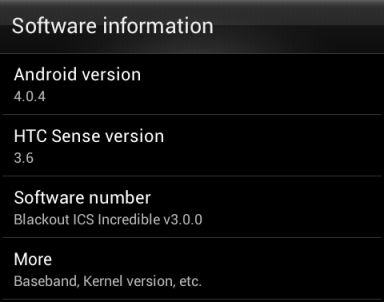
All that has changed. I am currently running Android 4.04 with the Sense 3.6 interface using Team Blackouts ICS Incredible ROM, and it runs better than Android 2.3.5 with Sense 3.0 (note, using a tweak to make the Sense widgets less taxing on resources which is built into the ROM). This ROM is ported from the official HTC Incredible S ROM, which has the same performance hardware as the HTC Desire HD.


But the HTC Desire HD Developers Community got together and fixed the camera, wake lock and other issues, and you now have a a fully working HTC Sense ICS ROM. Three right now actually. There are some small bugs, which are being worked out, but these related mainly to integrated apps (FM Radio, Dolby Sound, Beats Audio and the like) which will be fixed shortly. Remember that not all HTC Desire HDs' have the same components inside. For example, some have a Samsung camera sensor, others have an Omnivision camera sensor.

How do you get Ice Cream Sandwich on you HTC Desire HD.

1. Root your phone.
2. Install a custom ROM.

Root your phone.

The best, easiest and safest way to root your phone is using the Advance Ace Hack Kit. This tool will do everything you need to root your phone, and even unlock a carrier locked version. It will leave you with a fully functional HTC Desire HD running Android 2.2. 

Remember, these is some risk in rooting your phone. So if you decide to do this, don't blame me if you phone gets bricked. Blame HTC for not giving an official update instead.

Pick a ROM

Once you phone is rooted pick a ROM and flash it. You have a lot of good choice right now. You can wait a few weeks so final issue can be ironed out. But all these ROM's are good enough to be a daily driver.

1. Android 4.04/Sense 3.6 - Blackout ICS Incredible v3.0.0. This ROM is ported  from HTC Incredible S.
2. Android 4.04/Sense 4.0 - Virtuous Infinity v.1.33.0 Alpha 3. This ROM is ported  from HTC One X.
3. Android 4.04/Sense 4.0A. This ROM is ported  from HTC One V.

So it can be done.

Why did HTC say it cannot be done? The HTC Desire HD has a 575 MB partition for the operating system. With Blackout ICS Incredible installed I have 60 MB of space left, and that includes a lot of HTC apps which I consider bloat like HTC Locations, Like, Reader, Notes, Tasks, Teeter and Watch. That also includes a lot of HTC apps I find useful, like Peep, FriendStream, Clock and the complete set of beautiful HTC widgets.

So why did HTC not do it. Simple. The remaining 60 MB is not enough to add the apps that the carriers add on to your HTC phones. Basically, HTC prioritized the interest of carriers over users.

Need help?

A blog is not a good venue to provide help. Need help, visit the HTC Desire HD Phandroid Forums. I, and several person much more knowledgeable will be there to help.

Friday, 10 August 2012

HTC One X Android 4.04 Sense 4.1 Update now OTA


The Tegra 3 version of the HTC One X is getting an over the air update to Android 4.04 with the Sense 4.1 UI. 


  • Smoother homescreen animations 
  • The ability to map menu functions to the Recent Apps key
  • Updated notification bar with the old Quick Settings tab from Sense 3.0
  • Improved performance of the stock web browser
  • Enhanced the image quality of the camera 
  • Memory enhancements
  • Updated audio software


The update is 148MB in size, it is advisable to use a Wi-Fi network to download it.

Monday, 6 August 2012

Sense 4.1 for Tegra 3 HTC One X: Blistering speed, better UI and longer battery life


Earlier this we saw the HTC One S with its Qualcomm S4 processor break the 5000 point barrier in the Quadrant benchmarks. A little over a month later the quad-core Galaxy S III scored 5642 points in the Quadrant Benchmark. The HTC's flagship, the One X scored a respectable 4842 points, but was left in the shadow of its lower cost sibling and Samsung's new monster.

A leaked version of Sense 4.1 ROM (2.15.401.5) for the Tegra  3 version of the HTC One X  ROM found its way to XDA Developers. The HTC One X with the leaked ROM scored close to 6000 on the Quadrant Benchmark test.

The new ROM is leaner and meaner. All 3-D effects were removed from the launcher to eliminate lag. There are also UI the most welcome of which is the ability to use the multitasking (recent apps) button as a menu button, which eliminates the on screen menu button which wasted a lot of screen real estate. The ROM also adds a dedicated button to the camera app which allows you switch between primary and front camera and a dedicated browser button for tab switching. WiFi signal is reportedly improved as well as better battery life.

The ROM is still based on Ice Cream Sandwich (Android 4.0.4), so more performance improvements can be expected when the Jelly Bean ROM is released.

Thursday, 2 August 2012

Android takes 68% of the Global Market Share in Quarter 2 of 2012

Operating system. Canalys reports that the Android Operating System has taken 68% of the Global Market share in Q2 of 2012. That is up from 47.6% for the same period last year.


Equally significant is that Android shipments in Quarter 2 of 2012 totaled more 107.8 million units, which is more than the total number of smartphones shipped during the same period last year. This represents a 110.4% growth. 

Apple's iOS also showed growth improving in terms the number of smartphone shipped, to 26 million units, up from 20.3 million in the same period last year. Its market share declined by over 2% to 16.4% since its 28% growth was below the in industries 46.9% growth.  

Windows Phone tool only 3.2% of the market, with just over 5 million units shipped for the quarter, but that is a growth of 277.3% year on year.

RIM's BlackBerry and Nokia's Symbian suffered steep declines in terms of units shipped for the quarter as compared to the same period last year.

Markets. Significantly, China is now by far the worlds largest smartphone market, with 27% of all smartphone shipments being shipped to China for the quarter. The United States accounted for 16% of all smartphone shipments.

Vendors. Samsung retained it position as top smartphone marker with shipping 45 million smartphones in the quarter, followed by Apple with 26 million. Nokia retained its third place position, while HTC moved up to fourth place, and RIM fell to fifth.

Monday, 30 July 2012

Android 4.1 "Jelly Bean" Flash Support

Adobe does not officially support Flash Player on Android 4.1, Jelly Bean. But actually Adobe Flash can run on Android 4.1. XDA Developers (who else) has a guide on how to install Adobe Flash on your Android 4.1 device.  You can find the instructions and the Flash Player download at this link.

You won't get Flash Player support on the Google Chrome browser, since the Chrome browser no longer support Flash. 


Sunday, 29 July 2012

Update on the Android Jelly Bean Updates


This is the status of Android 4.1, Jelly Bean, updates as far as we have cobbled together.

Nexus. The Galaxy Nexus and the Nexus S have their Jelly Bean rolling out.

Samsung. While it is not official, it looks pretty sure that like the Samsung's 2011 line-up, the Galaxy S II and the Samsung Galaxy Note will be getting Jelly Bean. The Samsung Galaxy S III will also be getting Jelly Bean. Expected time of arrival is by September 2012. I would expect to see at least the Samsung Galaxy Tab 7.7 added to this list.

Samsung really only takes care of their top end devices in terms of updates. But this is an improvement from their Android 4.0, Ice Cream Sandwich updates which did not make it to the Samsung Galaxy S. At least now Samsung is covering their current and previous years top of the line, S series.

HTC. HTC has official confirmed that the HTC One X, XL and One S will be getting updated to Android 4.1 Jelly Bean.

HTC did a great job with Gingerbread updates, and used to be regarded as the best OEM for updates. Since Ice Cream Sandwich, they have lost a lot of ground in that regard. Right now it looks like the best OEM in terms of updates is Sony.

Sony. In 2010 to 2011, Sony had a bad rep for updates. All that has changed. Practically, it's entire 2012 line-up, including it lowest end phones are getting or about to received Ice Cream Sandwich. While unofficial the word is, Sony's 2011 phone stay at Ice Cream Sandwich, while all of Sony's 2012 phones are going to get Jelly Bean.

Update: It looks like  Sony's 2011 phones might be seeing Jelly Bean too.

Asus. The Asus Tranformer Pad, Transformer Prime and Transformer Pad Infinity will be getting Jelly Bean.


LG. No word yet. What is certain is that the LG Optimus 2X and LG Optimus Black wont be getting Jelly Bean. To compound the bad news, Ice Cream Sandwich updates for this phone have just been cancelled.

Friday, 27 July 2012

The HTC Desire HD got beaned by Jelly Bean


We wrote about the official cancellation of by HTC of its Android 4.0, Ice Cream Sandwhich (ICS), update for its 2010 flagship  phone, the HTC Desire HD. The HTC Desire HD was released on October 2010. The official reason given for the cancellation was:

*After extensive testing, we’ve determined that the current version of HTC Sense with Android provides customers with the best experience on the HTC Desire HD. When we consider new versions of software, we weigh a number of factors, but ultimately the customer experience on the product is the deciding factor. We apologize for any confusion this change may have caused our customers. (Source: HTC Blog)

Four month can make a world of difference. HTC was rather vague on why it decided not to update the HTC Desire HD. Looking at the HTC Desire HD this is some of the basic details of the phone:

  • 1GHz Scorpion processor
  • Qualcomm MSM8225 chipset
  • Adreno 205 graphics
  • 768 MB of RAM
  • 1.5 GB ROM
  • Released October 2010

After announcing the cancellation of the ICS update for the HTC Desire HD, HTC started rolling out ICS for the HTC Incredible S.

  • 1GHz Scorpion processor
  • Qualcomm MSM8225 chipset
  • Adreno 205 graphics
  • 768 MB of RAM
  • 1.5 GB ROM
  • Released February  2011

It would seem the main reason for cancelling the HTC Desire HD's update is that it was released four month earlier than the HTC Incredible S.

Beaned by Jelly Bean. HTC started updating its phones to ICS in March 2012, four month after the released of the new operating system. It planned to roll out ICS to several phones between March to August 2012. HTC probably expected the next version of Android to come out on October or November 2012 with the launch of a new Nexus phone.

Than something surprising happened. In the end of June 2012, Google announced its Nexus 7 tablet which shipped with Android 4.1. HTC would need to get Android 4.1 (Jelly Bean) on its current phones as soon as possible to help their sales, especially considering HTC sales are down considerably from 2011 figures. HTC announced that the HTC One X, XL and S would be getting updated to Jelly Bean. 

The OTA update for the HTC Incredible S is being rolled out as I write this, and the HTC will probably start rolling out the update for the Desire S in August 2012. It looks like the real reason for the cancellation of the HTC Desire HD update is because HTC has to move on to working on Jelly Bean updates for the HTC One X, XL and S. HTC cannot say that publicly, hence the rather vague and odd reason for the cancellation of the HTC Desire HD ICS update.

//PART 2